


一、背景
传统意义上,应用读取系统剪贴板数据时,需要拥有读取剪贴板的权限。若用户误关闭该权限,将影响应用本身的粘贴功能。同时,在应用读取剪贴板时,系统通过Toast提醒的方式告知用户应用读取了剪贴板,造成频繁的用户打扰。
基于以上问题,我们提供粘贴控件解决此问题。接入粘贴控件将不再依赖剪贴板读取权限,且读取过程中无Toast提示。
二、功能介绍
1. 应用场景介绍
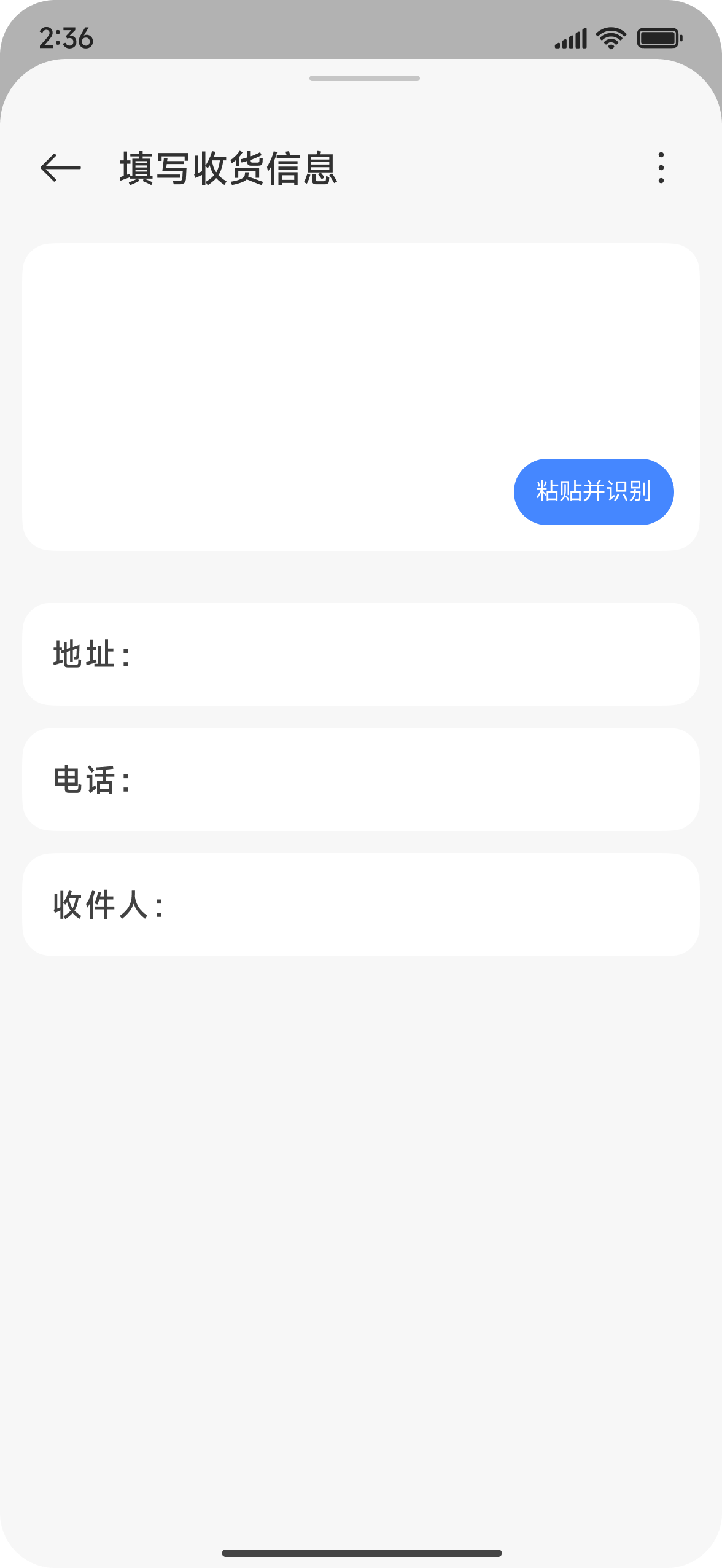
应用通过接入粘贴控件SDK,可在需要读取剪贴板相关内容时,将系统粘贴控件嵌入到应用界面中(如图一),在用户点击后,获取到当前系统剪贴板的数据。
图一:应用嵌入粘贴控件
2. 粘贴控件功能介绍
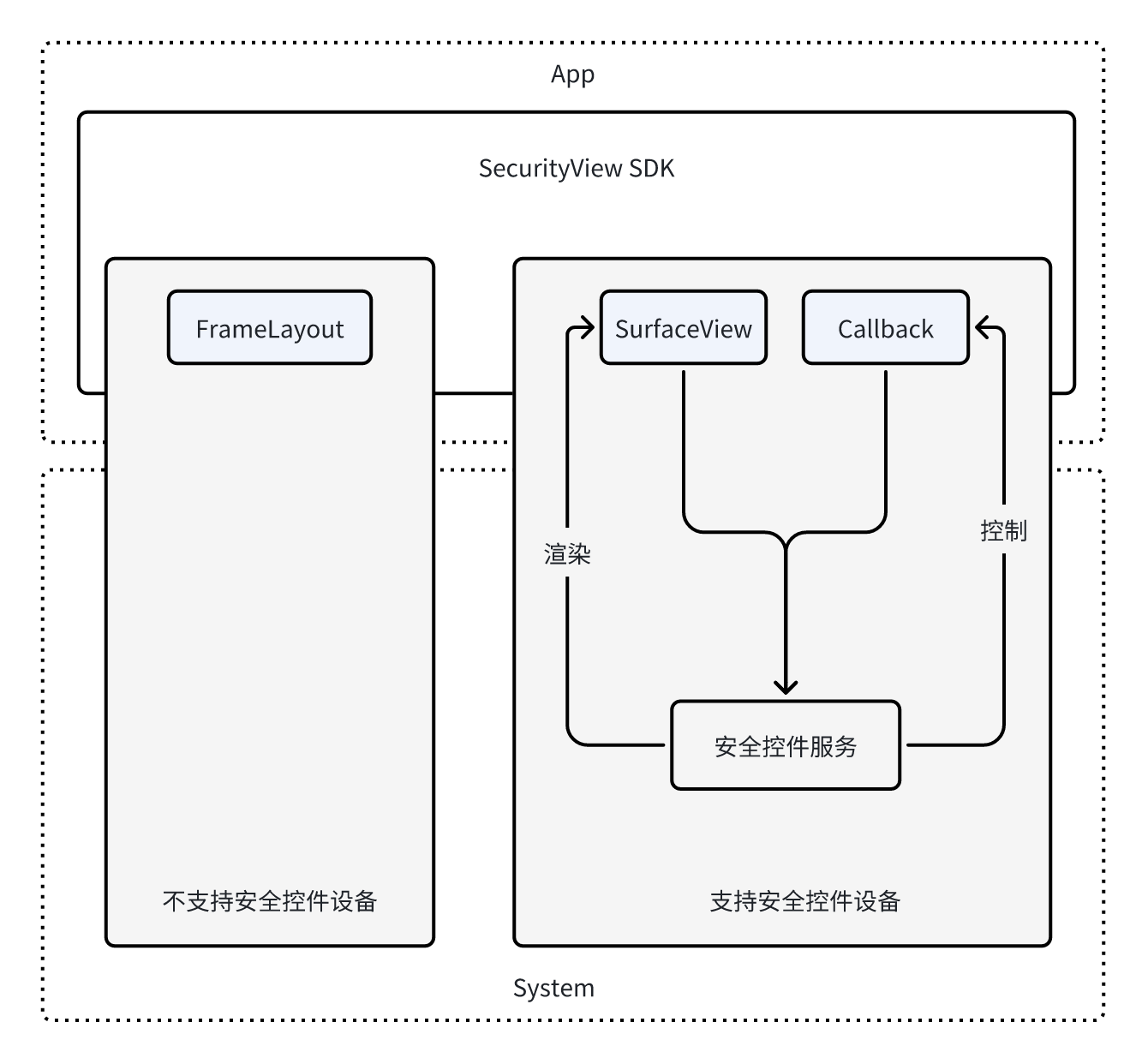
粘贴控件是由系统提供的特殊能力,在应用通过SDK接入该控件后,会根据当前系统是否支持安全访问的能力,来自动完成兼容:
- 在不支持安全控件的版本,控件表现为FrameLayout,由应用进程完全控制,读取剪贴板依赖剪贴板权限;
- 在支持安全控件的版本,表现为FrameLayout内置SurfaceView,由系统侧控制,系统完全负责对SurfaceView渲染和控制。并在用户点击相关的控件后,将剪贴板内容传递给应用进程,这个过程不再检查接入方的读取剪贴板权限,且不再提醒。
图二:粘贴控件架构
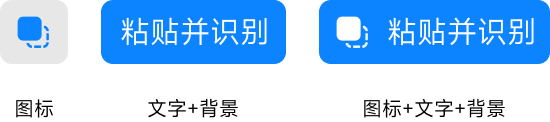
系统提供的粘贴控件将提供一定的UI自定义能力,使粘贴控件更契合应用页面风格。粘贴控件将支持背景、文字、图标三种元素的自定义,可选择3种元素的3种组合。
- 文字+背景
- 图标+背景
- 文字+图标+背景
图三:粘贴控件示意
三、 适用范围
当前支持粘贴控件的操作系统版本如下
- ColorOS 16(基于Android 16)及以上
- HyperOS 3(基于Android 16)及以上
- OriginOS 6(基于Android 16)及以上
- MagicOS 10(基于Android 16)及以上
四、接口说明
1. 图标参数设置
setIconType
函数功能:设置控件图标,默认为clipboard_list_icons数组中第一个样式
参数说明:
| 参数名 | 参数类型 | 参数说明 |
| iconIndex | int | 图标数组下标,取值范围参考R.array.clipboard_list_icons |
setIconSize
函数功能:设置控件图标大小
系统限制:以440dpi设备为例,图标默认大小为28dp,最小为20dp
参数说明:
| 参数名 | 参数类型 | 参数说明 |
| iconSize | int | 图标大小,单位px |
setIconColor
函数功能:设置控件图标颜色,默认为黑色
参数说明:
| 参数名 | 参数类型 | 参数说明 |
| iconColor | int | 图标颜色值 |
2. 文字参数设置
setTextType
函数功能:设置控件文字
参数说明:
| 参数名 | 参数类型 | 参数说明 |
| textIndex | int | 文字数组下标,取值参考 R.array.clipboard_paste_list |
setFontSize
函数功能:设置控件文字大小
系统限制:以440dpi设备为例,默认为14sp,最小为11sp
参数说明:
| 参数名 | 参数类型 | 参数说明 |
| fontSize | int | 文字大小,单位px |
setFontStyle
函数功能:设置文字式样
参数说明:
| 参数名 | 参数类型 | 参数说明 |
| fontStyle | int | 文字式样,对应TypeFace,默认Typeface.NORMAL,可选择Typeface.BOLD,Typeface.ITALIC,Typeface.BOLD_ITALIC |
setFontWeight
函数功能:设置文字权重
参数说明:
| 参数名 | 参数类型 | 参数说明 |
| fontWeight | int | 文字权重,标准取值有100,200,300,400,500,600,700,800,900 |
setFontFamily
函数功能:设置文字Family
参数说明:
| 参数名 | 参数类型 | 参数说明 |
| fontFamily | String | 文字Family,标准可选sans-serif, serif, monospace等 |
setFontColor
函数功能:设置文字颜色,默认黑色
参数说明:
| 参数名 | 参数类型 | 参数说明 |
| fontColor | int | 文字颜色值 |
3. 背景参数设置
setWidth
函数功能:设置控件宽度。
参数说明:
| 参数名 | 参数类型 | 参数说明 |
| width | int | 控件宽度值,单位px。可以在布局文件中设置固定大小,或者设置wrap_content、match_parent属性 |
setHeight
函数功能:设置控件高度
参数说明:
| 参数名 | 参数类型 | 参数说明 |
| height | int | 控件高度值,单位px。可以在布局文件中设置固定大小,或者设置wrap_content、match_parent属性 |
setConstraintSize
函数功能:设置控件最小/最大宽高
参数说明:
| 参数名 | 参数类型 | 参数说明 |
| minWidth | int | 最小宽度,单位px |
| minHeight | int | 最小高度,单位px |
| maxWidth | int | 最大宽度,单位px |
| maxHeight | int | 最大高度,单位px |
setPadding
函数功能:设置控件内padding
系统限制:以440dpi设备为例,默认上下5dp,左右9dp。
参数说明:
| 参数名 | 参数类型 | 参数说明 |
| paddingLeft | int | 左内边距,单位px |
| paddingTop | int | 上内边距,单位px |
| paddingRight | int | 右内边距,单位px |
| paddingBottom | int | 下内边距,单位px |
setBgColor
函数功能:设置控件背景颜色,默认完全不透明,当背景色透明度大于90%时,默认调整为完全不透明
参数说明:
| 参数名 | 参数类型 | 参数说明 |
| bgColor | int | 背景颜色值 |
setBorderStyle
函数功能:设置边框风格,默认不设置边框风格。
参数说明:
| 参数名 | 参数类型 | 参数说明 |
| borderStyle | int | 边框风格,0-实线,1-虚线 |
setBorderWidth
函数功能:设置边框线条宽度,默认边框宽度为0。
参数说明:
| 参数名 | 参数类型 | 参数说明 |
| borderWidth | int | 边框线条宽度,单位px |
setBorderColor
函数功能:设置边框线条颜色。
参数说明:
| 参数名 | 参数类型 | 参数说明 |
| borderColor | int | 边框线条颜色 |
setBorderRadius
函数功能:设置边框圆角半径
系统限制:以440dpi设备为例,默认为5dp
参数说明:
| 参数名 | 参数类型 | 参数说明 |
| borderRadius | int | 边框圆角半径,单位px |
setBorderRadius
函数功能:设置边框圆角半径(分别设置四个角)
参数说明:
| 参数名 | 参数类型 | 参数说明 |
| topLeft | int | 左上角圆角半径,单位px |
| topRight | int | 右上角圆角半径,单位px |
| bottomLeft | int | 左下角圆角半径,单位px |
| bottomRight | int | 右下角圆角半径,单位px |
4. 控件内元素布局
setViewLayoutDirection
函数功能:设置控件文字的排版方向
参数说明:
| 参数名 | 参数类型 | 参数说明 |
| layoutDirection | int | 排版方向,0-横向,1-纵向 |
setAlign
函数功能:设置控件对齐方式,调用方法参见代码调用示例
参数说明:
| 参数名 | 参数类型 | 参数说明 |
| aligns | SecViewInnerLayoutStyle.ALIGN | 对齐方式组合,可由ALIGN枚举值组合 |
ALIGN枚举值: LEFT_RIGHT_CENTER(0x01) - 水平居中 TOP_BOTTOM_CENTER(0x02) - 垂直居中 LEFT(0x04) - 左对齐 RIGHT(0x08) - 右对齐 TOP(0x10) - 上对齐 BOTTOM(0x20) - 下对齐
setTextIconSpace
函数功能:设置控件文字和图标间距
参数说明:
| 参数名 | 参数类型 | 参数说明 |
| textIconSpace | int | 文字和图标间距,单位px |
5. 其他
setFeedback
函数功能:设置按压时控件透明度
参数说明:
| 参数名 | 参数类型 | 参数说明 |
| feedback | int | 按压时控件透明度,取值范围0-100 |
commitMultiple
函数功能:整体提交属性更改,在updateTask中批量修改属性,调用方法参见代码调用示例
参数说明:
| 参数名 | 参数类型 | 参数说明 |
| updateTask | Runnable | 该Runnable提供批量修改属性作用 |
setIconTextVisible
函数功能:设置粘贴控件按钮和文本是否可见
系统限制:图标和文本不能同时设置为不可见
参数说明:
| 参数名 | 参数类型 | 参数说明 |
| iconVisible | boolean | 图标是否可见 |
| textVisible | boolean | 文本是否可见 |
addCallback
函数功能:添加粘贴控件的事件回调
参数说明:
| 参数名 | 参数类型 | 参数说明 |
| callback | PasteCallback | 粘贴事件回调接口 |
securityWidgetAvailable
函数功能:检查系统是否支持安全控件服务
参数说明:无
返回值:
| 类型 | 说明 |
| boolean | true-支持,false-不支持 |
SecurityPasteButton#PasteCallback
函数功能:粘贴控件的回调函数,包括onPaste和onRestrict两个方法
onPaste
函数功能:当用户点击后触发剪贴板回调
参数说明:
| 参数名 | 参数类型 | 参数说明 |
| clipData | ClipData | 剪贴板数据,可能为空 |
注意事项:回调运行在SecurityViewThread线程中,避免在回调中进行耗时操作,或者更新UI
onRestrict
函数功能:处于受限状态时触发回调
参数说明:
| 参数名 | 参数类型 | 参数说明 |
| reason | String | 受限原因描述 |
五、调用示例
下载粘贴控件SDK:http://39.106.70.232:41180/gsaidemo/audiodemo/raw/master/security/SecurityPasteView.aar
在布局文件xml中添加粘贴控件:
<androidx.constraintlayout.widget.ConstraintLayout xmlns:android="http://schemas.android.com/apk/res/android"
 xmlns:app="http://schemas.android.com/apk/res-auto"
 android:layout_width="match_parent"
 android:layout_height="match_parent">

 <com.os.security.sdk.PasteButton
 android:id="@+id/paste_button"
 android:layout_width="100dp"
 android:layout_height="50dp"
 app:layout_constraintStart_toStartOf="parent"
 app:layout_constraintTop_toTopOf="parent" />
</androidx.constraintlayout.widget.ConstraintLayout>
在代码中使用或更新粘贴控件:
// Kotlin
pasteButton = findViewById<SecurityPasteView>(R.id.paste_button).apply {
 addCallback(object : SecurityPasteView.PasteCallback {
 override fun onPaste(p0: ClipData?) {
 runOnUiThread {
 mText.setText(p0?.getItemAt(0)?.text ?: "无内容")
 }
 }

 override fun onRestrict(p0: String?) {
 Log.w("SecurityClipboardService ", "onRestrict$p0")
 }
 })}
// 更新
securityView.setBgColor(0xFFFF0000)
// 批量更新
pasteButton.commitMultiple {
 pasteButton.setWidth(randomInt)
 pasteButton.setHeight(randomInt)
 pasteButton.setBgColor(randomColor or 0xFF000000.toInt())
 pasteButton.setIconType(random.nextInt(3))
 pasteButton.setIconSize(randomInt)
 pasteButton.setFeedback(random.nextInt(100))
 pasteButton.setViewLayoutDirection(0)
 pasteButton.setViewStyle(2)
 pasteButton.setFontSize(100)}
// JavaSecurityPasteView pasteButton = findViewById(R.id.paste_button);
pasteButton.addCallback(new SecurityPasteView.PasteCallback() {
 @Override
 public void onPaste(ClipData clipData) {
 runOnUiThread(() -> mText.setText(clipData != null ?
  clipData.getItemAt(0).getText() : "无内容"));
 }

 @Override
 public void onRestrict(String s) {
 Log.w("SecurityClipboardService ", "onRestrict " + s)
 }});
// 更新
securityView.setBgColor(0xFFFF0000);
// 批量更新
pasteButton.commitMultiple(() -> {
 pasteButton.setWidth(randomInt)
 pasteButton.setHeight(randomInt)
 pasteButton.setBgColor(randomColor or 0xFF000000.toInt())
 pasteButton.setIconType(random.nextInt(3))
 pasteButton.setIconSize(randomInt)
 pasteButton.setFeedback(random.nextInt(100))
 pasteButton.setViewLayoutDirection(0)
 pasteButton.setViewStyle(2)
 pasteButton.setFontSize(100)});
该适配指南与金标联盟官网适配指南一致,您也可查阅金标联盟官网中公示适配指南。
金标联盟官方文档地址:https://www.itgsa.com/doc/6631953378231296